Monsters, Minions & Solo Monsters
The system gives you three kinds of monster actor, each matching one of the roles monsters play in Nimble. Pick the right type when you create the actor and the combat tracker, sheets, and automation all behave correctly on their own.
Which type do I use?
| Type | Use it for | What the system does differently |
|---|---|---|
| NPC | Ordinary monsters and foes | The standard monster: hit points, one turn per round after the characters. |
| Minion | Weak monsters that swarm | No hit point bar on the sheet; can attack in groups and share a single tracker turn (see Running Combat). |
| Solo Monster | Boss fights | Takes a turn after every character's turn, and has dedicated slots for Bloodied and Last Stand features. |
You choose the type in the actor creation window. If you're not sure, use NPC.
Legendary monsters ship ready-made
The Nimble Legendary Monsters compendium contains the legendary monsters from the rulebook as fully built solo monsters. Several bring their own companion minions too. Check there before building a boss from scratch.
A tour of the monster sheet
All three types share the same sheet. The header shows the portrait (click it to change the image), the monster's name, and a metadata line such as "Level 3 Medium Goblin". Click the edit button beside the metadata to change the level, creature type, size, and the monster's damage resistances (half damage) and immunities (no damage), which the Apply Damage button honors automatically. For NPCs it also covers whether the monster is a flunky (see the Nimble rulebook for what that means at the table). NPCs and solo monsters also get a hit point bar in the header, with fields for current, maximum, and temporary hit points; minion sheets skip the bar entirely (see the Nimble rulebook for how minions handle damage).
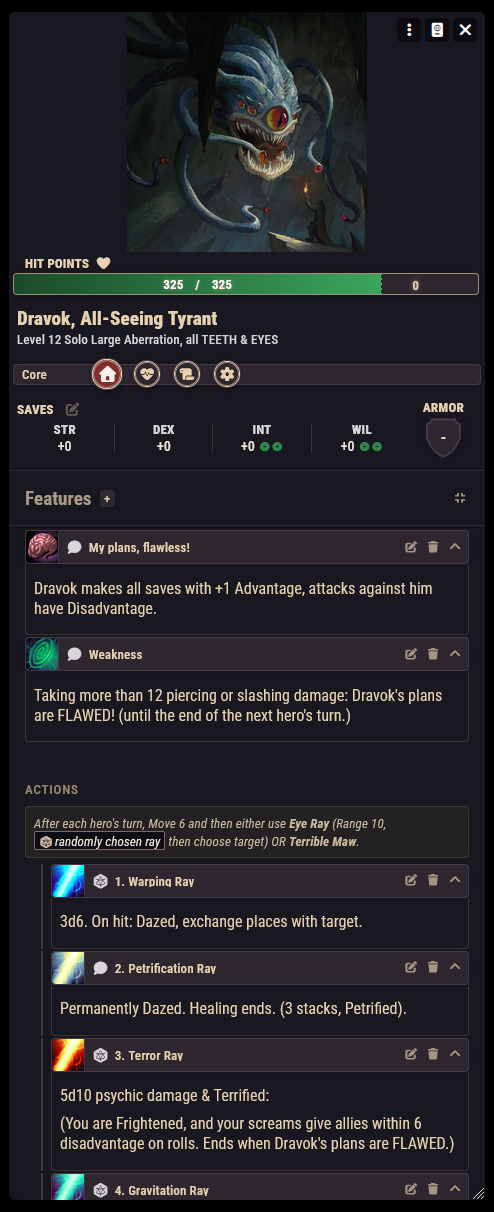
The sheet has four tabs:
- Core: armor, movement speeds, saving throws, and the monster's features and actions. This is where you'll spend the fight.
- Conditions: the same conditions list as the character sheet; toggle conditions on and off here or from the token. See Conditions.
- Notes: the monster's description and any notes of your own.
- Settings: cosmetic controls for how the portrait sits in its frame (offset and scale).
Using features and actions
Everything a monster can do lives on the Core tab as a monster feature, sorted into groups:
- Features: passive abilities. Their text is there when you need it.
- Actions: attacks and activated abilities. A monster's attack routine can appear as an attack sequence: a parent entry describing the routine, with its individual attacks nested beneath it.
- Bloodied and Last Stand: solo monster phase abilities, kept in their own groups so they're impossible to miss when the fight turns.
Click an action to use it: the system rolls its attack and damage and posts a chat card, where hits, misses, and an apply-damage button are handled for you, the same flow as player attacks (see Dice & Chat). Hover an entry to reveal its edit and delete buttons, and use the plus button in a group header to add a new feature.
Don't open sheets mid-fight if you don't have to
During combat, the Combat System panel can roll monster and minion actions straight from the canvas: select the token, pick the action, roll. See Running Combat.
Solo monsters
Solo monsters are built for the boss-fight math: the tracker automatically gives them a turn after every character's turn, so a lone dragon keeps pace with a whole party. Their Bloodied and Last Stand features sit in their own sections of the Core tab so the phase change is right in front of you when their hit points cross the line.
Minions
Minions are deliberately lightweight: no hit point tracking on the sheet, and they shine in groups. Select several minion tokens during combat and the Combat System panel rolls all their attacks as one group attack with a single combined damage total. Minions that attack together share one turn in the tracker for the rest of the round. The full workflow is on the Running Combat page.
The monster compendiums
The system ships with everything from the rulebook, ready to drag onto a scene:
- Nimble Monsters: the standard bestiary, organized into folders by family (bandits, goblins, kobolds, horrors, and so on). Contains NPCs and minions.
- Nimble Legendary Monsters: the legendary monsters as solo monster actors, plus the companion minions some of them summon.
- Nimble Tables: roll tables used by game content, including the Chaos Table, the Control Table, and Lodging Boons.
Drag a monster from a compendium into the sidebar or straight onto a scene. Imported monsters are regular actors: edit them freely without affecting the compendium copy.
Want to build your own, or tweak a stat block beyond a few numbers? Homebrew Monsters covers creating monsters and their features from scratch, and Importing & Exporting shows how to pull monsters in from Nimble Nexus.