Inline Roll Buttons
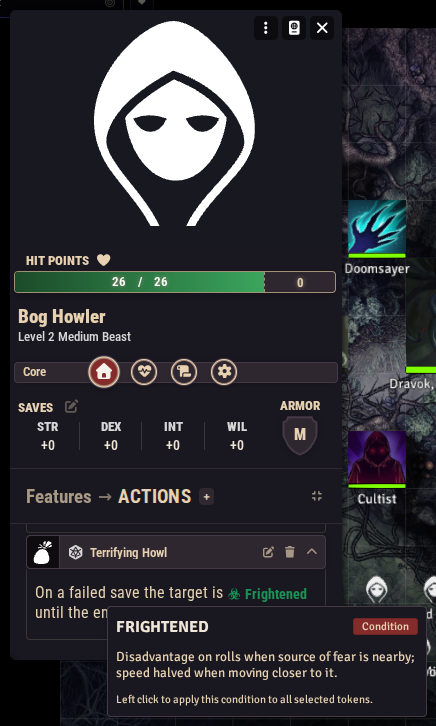
Suppose your Terrifying Howl feature says "the target is Frightened", and you want the word Frightened to be a button that shows the condition's rules on hover and applies it with a click. That is what inline roll buttons are for: small tags you type into any rich text, which the system replaces with live buttons when the text is displayed.
They work anywhere rich text is rendered: item, spell, and feature descriptions, monster features, journal pages, and chat messages.
The general syntax
Every button is written between double square brackets, starting with a slash and a button type, followed by space-separated key=value arguments:
[[/type key=value key=value]]Three button types are recognized: check, savingThrow, and condition (the type name is not case-sensitive). Argument values are lowercased when read. Keep values to single words (every current argument is a single word) and do not put spaces around the = sign.
Condition buttons: [[/condition]]
The workhorse. It renders a labeled button with the condition's name and a hazard icon. Hovering it shows a tooltip with the condition's name, a "Condition" tag, the condition's full rules text, and a footer noting that a left click applies the condition to all selected tokens.
It takes a single argument:
| Argument | Required | Value |
|---|---|---|
condition | yes | The condition's id: the lowercase, one-word form of its name, e.g. frightened, prone, smoldering. |
Examples:
The target is [[/condition condition=frightened]] until the end of its next turn.Renders the sentence with a Frightened button in place of the tag.
On a failed save the creature is [[/condition condition=poisoned]] and knocked [[/condition condition=prone]].Two condition buttons in one line, each carrying its own rules tooltip.
The full list of conditions and their descriptions is on the conditions reference. Because the argument value is lowercased and ids are matched exactly, an unknown or misspelled id still renders a button but with an empty label. If your button comes out blank, check the id.
One id that cannot be used
lastStand is the only condition id containing a capital letter. Since argument values are lowercased during parsing, [[/condition condition=lastStand]] will not resolve to it.
Check buttons: [[/check]]
Renders a button with a d20 die icon. The matcher accepts any key=value arguments after the type, but in the current version none of them are read: the button displays only the die icon, with no label or tooltip.
Make a check: [[/check skill=finesse]]Renders a small d20-icon button in the text.
Display-only for now
Check buttons currently render as an icon and do not perform a roll when clicked, regardless of the arguments you pass. If you need a clickable skill roll in a description today, players can roll skills from their sheet instead; keep the skill name in your prose.
Saving throw buttons: [[/savingThrow]]
The savingThrow type is recognized by the matcher, but in the current version the tag produces no button at all: the text is left exactly as you typed it.
[[/savingThrow saveType=will]]Currently renders nothing (the raw text remains).
Prefer a Save effect
For anything that should actually prompt a save, configure a Save effect on the item's Activation tab. Its chat card includes a working d20 button that rolls the saving throw for all selected tokens.
Plain dice rolls: [[/r]]
Not a system button but worth knowing: Foundry's own inline roll syntax works in all the same places, and the shipped compendium uses it constantly:
Roll [[/r 1d20]] on the chaos table.The trap deals [[/r 2d6]] damage.Each renders a clickable roll that posts its result to chat. Compendium content also uses formula references in these, such as [[/r 1d20+@level]] on legendary monsters.
Common mistakes
- Missing the key.
[[/check finesse]]does not match: arguments must bekey=valuepairs, so write[[/check skill=finesse]]. - Spaces around the equals sign.
[[/condition condition = prone]]does not match. Writecondition=prone. - Display names instead of ids.
condition=Frightenedworks (values are lowercased), butcondition="last stand"or a misspelling likecondition=frightgives you a blank-labeled button. Use the ids from the conditions reference. - Unknown types. Anything other than
check,savingThrow, orcondition(plus Foundry's own tags like/r) is left as plain text.
Snippet gallery
Copy, paste, adjust:
The target is [[/condition condition=frightened]].
The target is [[/condition condition=prone]].
The target is [[/condition condition=grappled]] (escape DC 12).
The creature is [[/condition condition=poisoned]] for 1 minute.
The target starts [[/condition condition=smoldering]].
On its next turn it is [[/condition condition=dazed]].
The victim falls [[/condition condition=unconscious]].
Roll [[/r 1d4]] to recharge this ability.
Deals [[/r 2d6]] bludgeoning damage to everyone in the area.
Roll [[/r 1d20]] and consult the table below.