Classes, Subclasses, Ancestries, Backgrounds & Boons
Five item types shape what a character is. Here is what each one contributes the moment it lands on a character sheet:
| Type | What it contributes when dropped on a character |
|---|---|
| Ancestry | Traits, delivered as rules. A character has exactly one: dropping a new ancestry automatically removes the old one. |
| Background | A description plus any rules you attach. Also one per character, replaced automatically. |
| Boon | A minor, major, or epic perk: description plus rules. Characters can hold several. |
| Class | The big one: it becomes the character's starting class at level 1, sets starting HP from its hit die size, adds a hit die, and drives every future level-up. Only one class can be dropped per character. |
| Subclass | Attaches to a class by name and adds its own features at the subclass levels (3, 7, 11, 15). |
The common thread: ancestries, backgrounds, boons, classes, and subclasses all carry a Rules tab, and rules are how they actually change the character. If you have not read Rules Builder Basics yet, start there.
Worked example: the Mirefolk ancestry
The simplest full homebrew loop is an ancestry with one trait. Build Mirefolk, swamp-dwellers who are hard to put down:
- In the Items sidebar, click Create Item, name it Mirefolk, and pick the Ancestry type.
- On the Description tab, write the trait the way players should read it: "Marsh-born. +1 max Wounds."
- On the Config tab you will find an Identifier field and an Exotic Ancestry checkbox. Tick the box if this ancestry belongs with the rare options rather than the common ones.
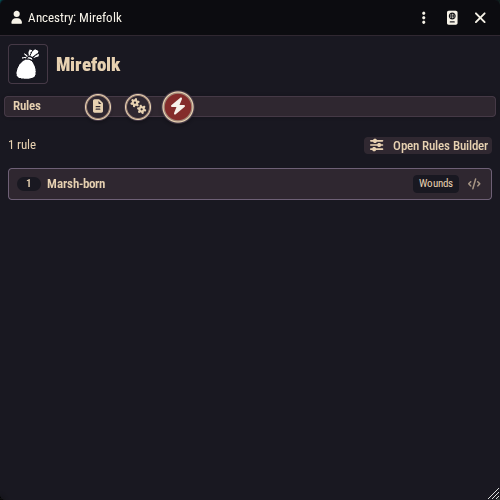
- On the Rules tab, click Open Rules Builder and add a Maximum Wounds rule: label it
Marsh-born, value1. - Drop the ancestry onto a test character and watch their maximum wounds go up by one. Drop a different ancestry on the same character and Mirefolk removes itself.
This is exactly how the compendium does it: the Dwarf ancestry's "Stout" trait is four rules: +1 max wounds, +2 max hit dice, −1 speed, and a Dwarvish language grant.
Backgrounds and boons
Both are the same recipe as the ancestry, minus the trait complexity:
- A Background is often pure description. The compendium's What? I've Been Around is just a paragraph with an inline dice roll in it, and no rules at all. Add rules only when the background mechanically changes the character.
- A Boon has one extra field on its Config tab: the Boon Type (Minor, Major, or Epic). Compendium boons show the pattern: Fiery (minor) is a single damage-bonus rule adding 1 fire damage; Lionhearted (major) carries an armor-class rule. Boons are handed out in play, so they are a favorite vehicle for one-off rewards.
Descriptions on all of these support inline roll buttons.
Subclasses
A subclass item has two key fields on its sheet: its Identifier and its Parent Class, the identifier of the class it belongs to. That single link is how everything finds everything: the class's progression tab lists every subclass whose parent matches, and the level-up process offers those subclasses when a character hits a subclass level (3, 7, 11, and 15).
A subclass's actual content (its features) are separate feature items tied to the subclass's group, gained at the subclass levels. The easiest way to create them correctly is from the parent class's Progression tab (below), which pre-fills all the linking fields for you.
Classes
A class is the most involved item in the system, split across a Description tab, a Config tab, a Progression tab, and a Rules tab.
The Config tab
- Identifier: the class's machine name. Everything else (features, subclasses, characters) links to the class through this, so set it once and never change it casually.
- Class Complexity: the 1-3 complexity rating shown to players.
- Key Stats: the class's key ability scores; the highest of them backs the
@keyreference in formulas. - Saving throw advantage / disadvantage: which save the class is naturally good and bad at.
- Hit Die Size: d4 through d12. This also determines starting HP when the class is dropped on a character.
- Mana Formula and Mana Recovery: leave the formula empty for non-casters; a formula (it can reference things like
@leveland ability modifiers) makes the class a caster, and the recovery setting says when the pool refills. - Armor Proficiencies and Weapon Proficiencies: what the class can use. Weapon proficiency names matter for crits: a weapon whose type is not in the wielder's list cannot critically hit.
- Feature Groups: extra group names whose features this class can draw from, used to share feature pools between classes.
The Progression tab
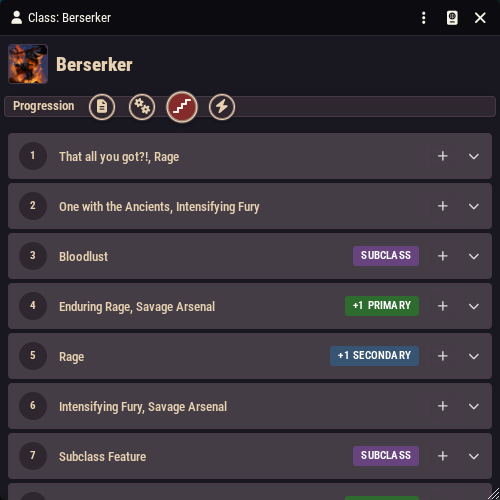
This is where "at level 3 the class hands the character this feature" is set up. The tab shows all twenty levels. Levels 4, 5, 8, 9, 12, 13, 16, and 17 come pre-marked as key stat increase (or boon) levels, with level 20 as the capstone. That schedule is part of the class itself.
Class features are not stored inside the class item. Each one is a separate Feature item that records which class it belongs to and at which level (or levels) it is gained. The Progression tab gathers every matching feature from your world and the compendiums and lays them out by level. That means:
- Click the add feature button on a level row and the system creates a new feature item with all the linking fields pre-filled: class, level, progression group. You only write the name, description, and any rules or activation.
- Click an existing feature to open and edit it. Features from a compendium are tagged as such; features you created in the world carry a world tag and can be deleted from here.
- Feature choices ("pick one fighting style") are groups of features sharing a group name. The tab has an add-new-choice button that starts a new selection group; add more features to the group and the level-up window will present them as a pick list.
- The subclass section at the bottom lists every subclass pointing at this class, with add buttons to create a new subclass or a new subclass feature at each subclass level, again with the linking pre-filled.
When a player levels up, the level-up window automatically grants the features registered at the new level, prompts for any choice groups, offers subclasses at subclass levels, and processes spell grants; see Advancement.
Start from a copy, not from blank
Strongly recommended: import an existing class from the Classes compendium and study or adapt it rather than starting empty. One important subtlety: because the progression is looked up by identifier, a duplicated class with the same identifier shows the original class's features. That is often exactly what you want ("the Berserker, but with my extra feature at level 3"): keep the identifier, and use the Progression tab's add buttons to layer your own world features on top of the compendium ones. If you want a genuinely new class, give it a new identifier and build its feature list fresh.
Features can do things too
A feature item is not limited to text plus rules. It also has a full Activation tab, so an ability like "Rage" or "Second Wind" can be clicked, roll dice, and post a chat card exactly like an item. See Item Activations & Effects.