Homebrew Monsters
On this page you will build the Bog Howler, a Level 3 swamp predator, from a blank actor to a finished stat block with a bite attack, a howl that frightens, and a passive feature. Along the way you will see what the Solo Monster and Minion types add, and two shortcuts that skip most of the typing.
Step 1: Create the actor and pick a type
In the Actors sidebar, click Create Actor. The creation window offers four types:
| Type | Use it for |
|---|---|
| Player Character | Player heroes, not monsters. |
| Standard | The normal monster type. This is what most of the Monsters compendium uses. |
| Solo Monster | Boss monsters designed to fight alone. Same stat block, plus the Bloodied and Last Stand feature slots come into their own here. |
| Minion | Fragile swarm troops. The sheet hides the hit point bar entirely, and minions never score critical hits. |
Pick Standard and name it Bog Howler.
The creation window is also the import window
The same Create Actor window links to the Nimble Nexus monster browser, which can import ready-made stat blocks in bulk. See Import & Export and the shortcuts at the end of this page.
Step 2: Fill in the stat block
The monster sheet has four tabs (Core, Conditions, Notes, and Settings), and almost everything lives on Core.
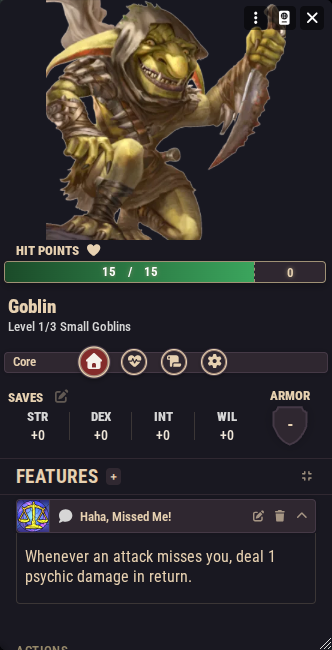
The metadata line. Under the monster's name you will see something like "Level 1 Medium". Click the edit button next to it to open the configuration window where you set:
- Level: free text, so fractional levels like
1/3and1/4work (the compendium Goblin is Level 1/3). - Creature Type: free text, such as "Beast" or "Goblins".
- Size Category: Tiny through Gargantuan.
- Damage Resistances: damage types the monster takes half damage from. Applied automatically when the GM clicks Apply Damage, and the button's preview shows the halved number.
- Damage Immunities: damage types the monster takes no damage from at all.
- Damage Vulnerabilities: recorded on the sheet for reference, but not yet automated; apply the vulnerability rule from the rulebook by hand.
- Flunky: a checkbox on Standard monsters. Flunkies can still miss, but never crit.
Resistances and immunities only kick in when the incoming damage has a known type; a roll with no damage type is applied in full.
For the Bog Howler: Level 3, Creature Type "Beast", Medium.
Hit points. Edit current, maximum, and temporary HP directly on the sheet. When a monster drops to half HP or less, the heart icon on its HP bar cracks to show it is bloodied.
Armor. Monsters do not wear armor items. Armor is a simple three-state value (none, Medium (M), or Heavy (H)), stepped up and down with the buttons beside the armor display on the Core tab. What Medium and Heavy armor mean in play is in the Nimble rulebook.
Saving throws. The four saves (Strength, Dexterity, Intelligence, Will) show their modifiers on the Core tab. Click a save to roll it straight to chat; the configuration button beside them opens a window to edit the modifiers.
Movement. Walk speed plus burrow, climb, fly, and swim speeds are set in their own configuration window opened from the sheet.
Step 3: Attacks and abilities are monster features
Everything a monster does is a Monster Feature item on its sheet. On the Core tab, click the add button in the features area to create one, then open it. A monster feature sheet has Description, Config, Activation, and Macro tabs. On Config, the important field is the Subtype:
| Subtype | What it is |
|---|---|
| Feature | A passive trait. Usually just a description. |
| Action | Something the monster actively does: an attack, a howl, a spell-like ability. |
| Attack Sequence | A grouping header. Drag action features onto it on the Core tab to nest them under the sequence, for monsters that make several strikes per activation. |
| Bloodied | An ability that matters once the monster is bloodied. Listed in its own group so it is easy to find at the right moment. |
| Last Stand | The Last Stand mechanic; see the Solo Monster section below. |
The Core tab groups features by these subtypes, and you can drag entries to reorder them or to nest actions under an attack sequence.
Give the Bog Howler three features:
- Ambush Instinct (subtype Feature). Just a description: "The Bog Howler has advantage on checks to hide in swamp terrain."
- Bite (subtype Action). On its Activation → Effects tab, add a Damage entry:
2d6+3piercing, Can Miss and Can Crit ticked, with a Full Damage outcome under On Hit. On Activation → Targets, set the Attack Type to Reach with a distance of 1. Monster features get this attack type field where player items do not. - Terrifying Howl (subtype Action). Add a Save effect: Will save, with a Condition entry (Frightened) under On Failed Save.
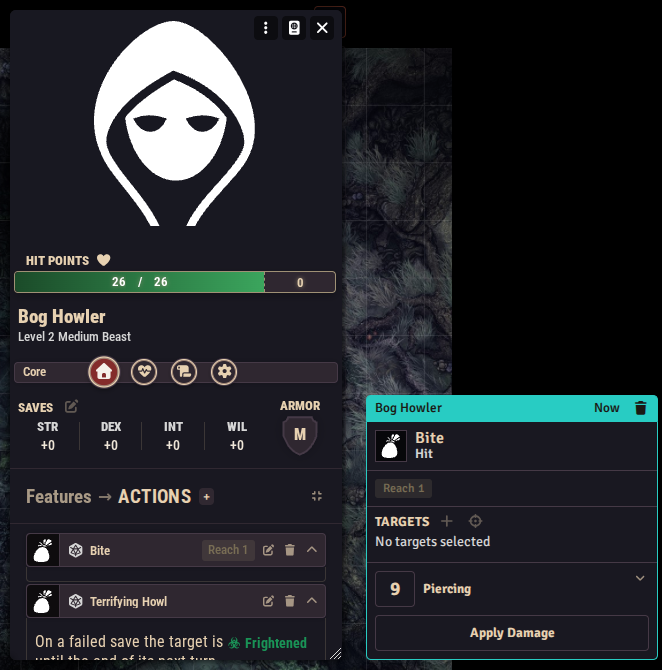
Activating features works like any item activation: click the action on the sheet, roll in the window that appears, and the chat card shows the damage with apply buttons, the save prompt, and the condition button. The full editor is documented on Item Activations & Effects. Feature descriptions support inline roll buttons, which the compendium uses for things like recharge dice.
Solo monster extras
A Solo Monster uses the same sheet and features, but two subtypes are made for it:
- Bloodied: solo monsters from the compendium ship with a Bloodied feature describing what changes at half HP; the cracked-heart indicator tells you when to use it.
- Last Stand: a feature with subtype Last Stand gains a Last Stand HP field on its Config tab. When the monster's HP would hit zero, the system instead heals it to that value, applies the lastStand and dying conditions, and posts a GM chat card. Set the field to 0 to disable the mechanic. The compendium's legendary monsters (for example Vael, Undying Necromancer, who returns at 90 HP) are worked examples.
Minion setup
Create the actor with the Minion type. The sheet is deliberately thin: no hit point bar, the same metadata window (level, creature type, size), saves, and features. A compendium minion typically has one action and one flavor feature. Minions never crit.
Minions shine in numbers: during combat the system can run group attacks, where a batch of minion tokens attacks together through a single panel. That workflow lives on the combat page; see Running Combat.
The two faster paths
Building from scratch is the long way. Prefer these:
- Duplicate and edit. Find the closest existing monster in the Monsters (or Legendary Monsters) compendium, import it into your world, duplicate it, and edit the copy. Every number and feature above is already wired up; you just change values and descriptions.
- Import a stat block. Use the Nimble Nexus browser from the Create Actor window to pull in published monsters wholesale, then reskin. See Import & Export.