Conditions
Conditions are status markers (Prone, Frightened, Grappled, and friends) that sit on a character or monster and show as icons on its token. The system ships with the full set of Nimble conditions; for what each one does, see the Conditions Reference (and the Nimble rulebook for the underlying rules).
Three ways to apply and remove them
- The token. Select a token and open its overhead controls (right-click the token). The status panel lists every condition by name. Click one to toggle it on or off, and use the clear-all button to wipe them.
- The sheet's Conditions tab. Both the character sheet and the NPC sheet have a Conditions tab listing every condition with a search box and an "active only" filter. Toggle a condition there to apply or remove it. Other temporary and passive effects on the actor are listed on the same tab.
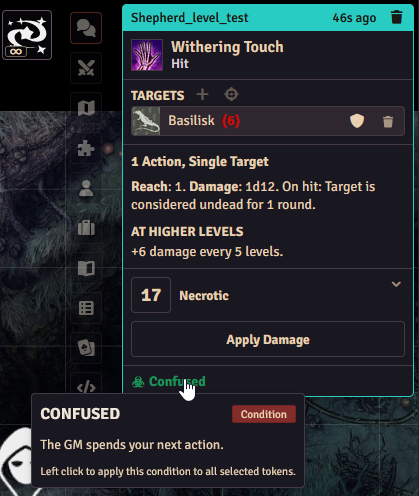
- Chat card buttons. When an attack, spell, or feature inflicts a condition, the condition appears as a button on its chat card. Select the affected tokens and click the button to apply the condition to all of them. Hover the button for the condition's description.
Linked conditions
Some conditions come bundled together, and the system tracks the relationships for you:
- Counts as. Some conditions imply others: Grappled also counts as Restrained (and the reverse), and Stunned counts as Incapacitated, Restrained, Paralyzed, and Unconscious for anything that checks those. You'll only see the icon you applied, but rules that look for the implied condition will find it.
- Applied together. Petrified automatically carries Incapacitated with it.
- Automatic Hampered. Applying Dazed, Grappled, Prone, Slowed, or Restrained automatically applies Hampered as well. When the last of those trigger conditions is removed, Hampered goes away on its own.
- Wounded stacks. Unlike other conditions, Wounded can be applied multiple times, one stack per wound.
Condition immunity
Items can make a character immune to specific conditions through a condition immunity rule (see the Rules Builder pages). Attempts to apply a condition the actor is immune to are blocked, including the automatic applications described above.
The Auto-Apply Conditions setting
The world setting Auto-Apply Conditions from Rules controls what happens when a feature's rules say "on X, apply condition Y" (for example, a weapon that poisons on a hit):
- On: when the trigger fires (damage is applied, a save is failed, a turn starts), the condition is applied to the target automatically.
- Off (the default): nothing happens automatically, but the condition still appears as a button on the chat card so the GM can apply it manually.
The linked-condition behavior above (Hampered, Petrified, and stacking) is always active regardless of this setting. See the Settings Reference.
Reload required
Changing Auto-Apply Conditions from Rules requires the world to reload before it takes effect.