Formulas & References
Every numeric field in the Rules Builder (a Stat Bonus's Bonus, an Armor Class rule's Formula, a Charge Pool's Max charges) accepts more than a plain number. You can write a formula that reads values off the character, so the effect scales automatically as they grow.
- A plain number:
2 - A reference:
@level - A mix:
@will + 1 - Dice, in fields that support them:
1d6
The reference vocabulary
References start with @ and are filled in from the character carrying the item. For player characters you can use:
| Reference | Value |
|---|---|
@level | Character level. |
@strength, @dexterity, @intelligence, @will | The character's stat modifiers. |
@key | The highest modifier among the character's class key stats, handy for class features that should work for every subclass build. |
@strengthSave, @dexteritySave, @intelligenceSave, @willSave | Saving throw modifiers. |
@arcana, @examination, @finesse, @influence, @insight, @lore, @might, @naturecraft, @perception, @stealth | Skill modifiers. |
You can also reach any value on the sheet by its full path, such as @attributes.hp.max or @attributes.wounds.value. On NPCs and monsters only the save shortcuts work, so use full paths for monster features. The Formula Reference lists every shortcut and full path, and which kinds of actor have each one.
Formulas support basic math (+, -, *, /, parentheses) and rounding helpers: floor(@level / 2) gives half the character's level, rounded down.
Context references
A few references are not read off the character sheet. They are filled in at the moment the rule does its work, and they exist only in the field that provides them. Writing one anywhere else leaves it unresolved, so keep them to the fields listed here.
| Reference | Available in | Value |
|---|---|---|
@n | Dice Consumer → Effect formula, Modify Consumer → Append formula | How many dice the player picked. |
@sum | Dice Consumer → Effect formula, Modify Consumer → Append formula | The total of the faces they picked. |
@poolMax | Dice Pool → a refill's Value | The pool's maximum size. |
@poolCurrent | Dice Pool → a refill's Value | How many dice are in the pool right now. |
These combine with the sheet references above, so a spend can scale with both the dice chosen and the character: (@strength + @dexterity) * @n reduces damage by STR+DEX for every die spent, and 2 * @sum doubles the total rolled.
The pool references make a refill relative rather than fixed. A refill with mode set and value @poolMax fills the pool to whatever its current maximum is, which keeps working when a later feature raises that maximum.
WARNING
An empty formula counts as 0. A formula the system can't understand shows an "Invalid roll formula" warning and the rule contributes nothing. See the debugging tips below.
Numbers vs. dice
Most rule fields need to settle on a single number the moment the sheet recalculates: a stat can't be "3 and a half, sometimes". In those fields, write plain numbers or references; if you sneak dice like 1d6 into them, the dice are skipped and count as 0.
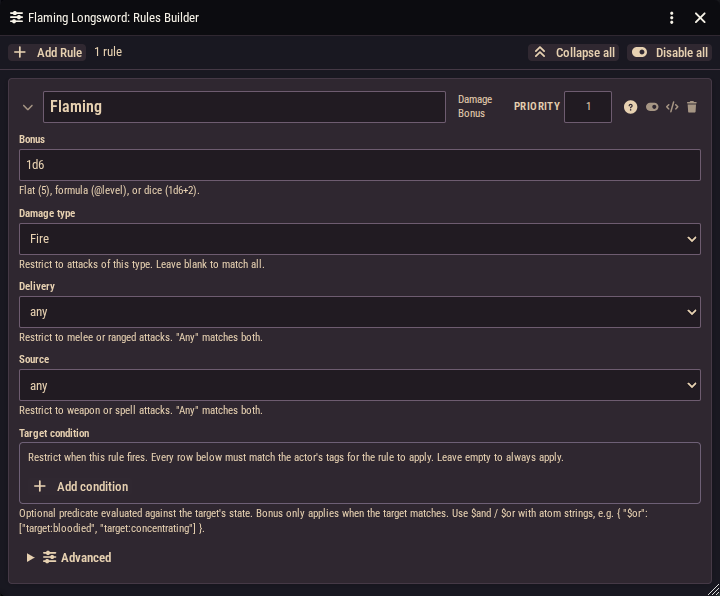
The exception is the Damage Bonus rule. Its Bonus field recognizes dice notation and keeps it as dice: the 1d6 is appended to the damage roll and rolled fresh on every attack. Anything without dice in it (2, @level) is resolved to a flat number and added to damage instead.
Worked examples
+1 damage per level (a Standard of the Legion boon that scales with the bearer):
- Rule: Damage Bonus · Bonus →
@level· Delivery →melee· Source →weapon
+Will modifier to spell damage (an Archmage's Focus wand):
- Rule: Damage Bonus · Bonus →
@will· Source →spell
+1d6 fire damage (a classic Flametongue sword):
- Rule: Damage Bonus · Bonus →
1d6· Damage type →Fire· Delivery →melee· Source →weapon
Charges that scale with your key stat (a class feature with @key + 1 uses of its power):
- Rule: Charge Pool · Max charges →
@key + 1
Debugging a formula
- Watch for the warning. "Invalid roll formula" pops up when the sheet recalculates a broken formula. Check for typos like
@leveor an unclosed parenthesis. - Test with a plain number first. If
2works but@willdoesn't, the reference is the problem. - Mind who's carrying the item.
@leveland stat references resolve on the character the item sits on. On a monster, most shortcuts resolve to nothing. - Dice doing nothing? You've probably used dice in a field that needs a single number. Only Damage Bonus rolls dice; everywhere else, replace
1d4with a flat value or a reference.