Rest & Recovery
Nimble characters track two layers of harm, and the sheet gives you two kinds of rest to recover from them. This page covers what the sheet tracks and what each rest button actually does. For what wounds and rests mean in the fiction, see the Nimble rulebook.
Wounds vs Hit Points
- Hit Points are the fast-moving number: the HP bar in the sheet header tracks current, temporary, and maximum HP, and drops with every hit.
- Wounds are the slow-moving one: droplet icons around your portrait, one per wound, with room for six by default (features can raise this). Click a droplet to mark or unmark a wound. A wound counter also appears next to the Hit Points heading while you have any.
HP comes back easily. Wounds don't: a safe rest heals exactly one.
Field Rest
Click the hourglass button in the sheet sidebar. The field rest window asks two things:
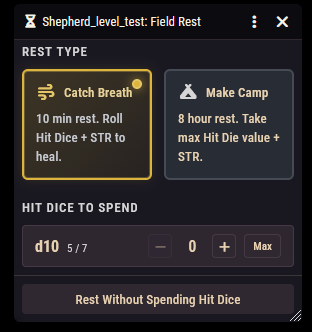
- Rest type. Catch Breath is a 10 minute rest where the hit dice you spend are rolled, adding your Strength modifier to each. Make Camp is an 8 hour rest where each spent hit die counts as its maximum value plus your Strength modifier instead of being rolled.
- Hit dice to spend. One row per die size showing how many you have left; use the plus, minus, and Max buttons to choose how many to spend. You can also rest without spending any.
A Modifiers section appears when relevant: it shows when your hit dice will be maximized (making camp, or a feature that always maximizes them), and lists any toggleable advantage options from your features. Tick one to roll those hit dice with advantage when its condition applies.
Resting posts a chat card summarizing the rest type, dice spent, total healing, and whether the dice were maximized or rolled with advantage. If your class recovers mana on a field rest, mana refills too and shows on the card.
Safe Rest
Click the moon button in the sheet sidebar. The safe rest window is a preview, not a form. It lists exactly what will happen before you commit:
- Hit Points restored to maximum, and any temporary HP removed.
- All hit dice restored.
- Mana restored to maximum, if your class recovers mana on a safe rest.
- One wound healed.
- Charges on features and items that recharge on a safe rest.
Anything already full is marked "Already full". Click the Safe Rest button to apply it all; a chat card summarizes what was recovered (no card is posted if there was nothing to recover).
Rolling hit dice from the sheet
You don't need a rest to spend hit dice. Click the roll button on the hit dice bar in the sheet header. The window lets you pick how many dice of each size to roll, plus two checkboxes:
- Add STR bonus: add your Strength modifier to each die (on by default).
- Apply healing to HP: apply the result to your HP immediately instead of just rolling (on by default).
Features that improve resting
Items and features can change how resting works through their rules: advantage on hit dice under a stated condition, always-maximized hit dice, bigger or bonus hit dice, and stronger healing potions. These show up automatically in the rest windows' Modifiers section or in the results. See the Rules Reference: Bonuses.