The Condition Box
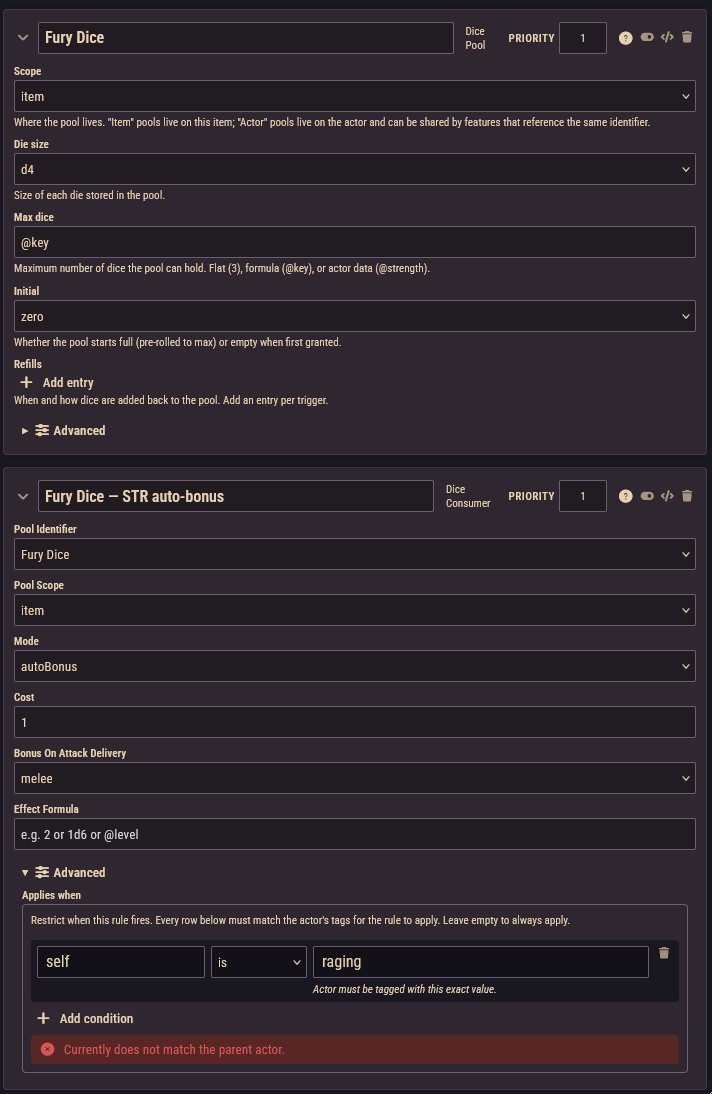
Every rule has a Condition box, found under Advanced on the rule card, labelled Applies when. It answers one question: when should this rule apply?
An empty Condition box means always. Fill it in and the rule only applies while the character matches every requirement you list. That's how you build things like "+2 Armor, but only while unarmored" or "this feature only kicks in from level 5".
How the system describes a character
Behind the scenes, the system constantly describes each character as a set of short descriptive tags. Each tag is a key and a value separated by a colon, for example level:5, armor:unarmored, or class:berserker. The Condition box works by checking whether the character's current tags satisfy your requirements.
These are the tag families that exist:
Characters (player characters):
| Tag | Meaning |
|---|---|
level:5 | Character level. |
class:berserker | Each class, by its identifier (the item's name in lowercase with dashes, e.g. The Cheat → the-cheat). |
ancestry:dwarf | The character's ancestry, by identifier. |
background:soldier | The character's background, by identifier. |
armor:equipped / armor:unarmored | Whether the character is wearing anything that actually provides armor. Exactly one of these is always present. |
self:shield / self:noShield | Whether the character carries a shield. |
strength:3, dexterity:1, intelligence:0, will:4 | The character's current stat modifiers. Some rule types apply before stat modifiers are computed; the builder shows a warning when a condition on these tags cannot work for the chosen rule type. |
proficiency:armor:..., proficiency:weapon:..., proficiency:language:... | Each proficiency the character has. |
All characters, NPCs, and monsters:
| Tag | Meaning |
|---|---|
size:medium | Size category: tiny, small, medium, large, huge, or gargantuan. Numeric comparisons understand this order, so "is at least large" works. |
disposition:hostile | The token disposition: friendly, neutral, hostile, or secret. |
self:bloodied | At or below half hit points (the Bloodied condition). |
self:dying | Has the Dying condition. |
self:lastStand | A solo or legendary monster at 0 HP (Last Stand). |
self:concentrating | Has the Concentration condition. |
self:fullHp | Currently at maximum hit points. |
minion / solo-monster | Present on minions and solo monsters respectively. |
enemiesAdjacent:2 / enemiesAdjacent:most | How many enemies are adjacent to the token, and whether this token has the most adjacent enemies. Only present when the adjacency tracking setting is enabled. |
The item itself: a rule also sees the tags of the item it sits on, such as type:object, identifier:belt-of-giant-strength, and for gear objectType:armor and each property:.... This mostly matters when you copy one rule between several items and want it to behave differently on some of them.
INFO
Most game conditions (Prone, Frightened, and so on) are not available as tags. Only the health and concentration states listed above are. To make a rule react to other conditions, look at the trigger-based rule types in the Triggers reference instead.
Building requirements
Each row in the Condition box is one requirement: a tag key, a comparison, and a value. Every row must match for the rule to apply. The key field suggests tag keys that exist on characters in your world as you type.
The comparisons are:
- is: the character must have this exact tag.
armorisunarmoredmatches the tagarmor:unarmored. - is one of: the tag's value must be any one of the values you list. This is your "or":
classis one ofberserker,commander. - is at least / is at most / is exactly / is between: compare the number after the colon.
levelis at least5matcheslevel:5and up.
There is no "not" comparison. For the states you'll usually want, the system provides opposite pairs instead: use armor is unarmored rather than "not wearing armor", and self is noShield rather than "no shield".
Below the rows, a live preview tells you where you stand: a note that there are no conditions and the rule always applies, "Currently matches the parent actor", or "Currently does not match the parent actor". The preview only appears when the item is on a character.
Worked examples
Only while unarmored (a monk-style feature granting bonus Armor while wearing nothing):
- Key
armor· is ·unarmored
Only from level 5 (a class feature that switches on at level 5):
- Key
level· is at least ·5
Only while bloodied (a trait that gets stronger below half HP):
- Key
self· is ·bloodied
Only for large-or-bigger creatures (a monster trait):
- Key
size· is at least ·large
Add several rows to combine requirements: a row for level is at least 5 and a row for armor is unarmored means both must hold.
Conditions about the target
Everything above tests the character carrying the item. One rule type can also test the character being attacked: the Damage Bonus rule has a separate Target condition box, checked against the target when the attack lands. The target tags available are target:bloodied and target:concentrating.
For example, a Goblin Cleaver axe that deals +2 damage to wounded enemies: add a Damage Bonus rule with Bonus 2, and in Target condition a row with key target · is · bloodied.
Debugging a condition that never matches
- Read the preview line. Put the item on a test character and open the rule card. "Currently does not match" plus your rows tells you which requirement to suspect; "Conditions are incomplete" means a row is half-filled (often an empty key or value).
- Delete rows one at a time. Because all rows must match, removing them one by one shows you exactly which row fails.
- Check the spelling. Tags are exact:
armorisunarmouredwill never matcharmor:unarmored. Class, ancestry, and background values are the item name in lowercase with dashes. - Check the comparison type. "is" needs the exact text after the colon; use "is at least" and friends only for numeric values like
level. - Remember the basics. The item must be on a character, gear must be equipped, and the rule must not be disabled; see the checklist in Rules Builder Basics.
For power users
In the raw JSON view of a rule, the Condition box is stored in a field named predicate. If you run into that word, it simply means the contents of the Condition box. Raw JSON also supports nesting requirements with $and and $or for combinations the row editor can't express, e.g. { "$or": ["self:bloodied", { "level": { "min": 10 } }] }.