Spells
On this page you will build Emberlance, a complete custom damage spell: a Tier 2 Fire spell with range that hurls a lance of flame for 2d8 fire damage, and grows by +1d8 for every extra mana spent on it. By the end you will know every field on the spell sheet, how upcasting is configured, and how to get the spell into a player's hands.
Learn from the compendium
The Spells compendium is full of finished examples. Glacier Strike shows simple upcast scaling (+1 area size per extra mana) and Heal shows choice-based scaling (+1 target, +4 reach, or +1d6 healing). Open them alongside this page.
Step 1: Create the spell
In the Items sidebar, click Create Item, name it Emberlance, and choose the Spell type. The spell sheet has five tabs:
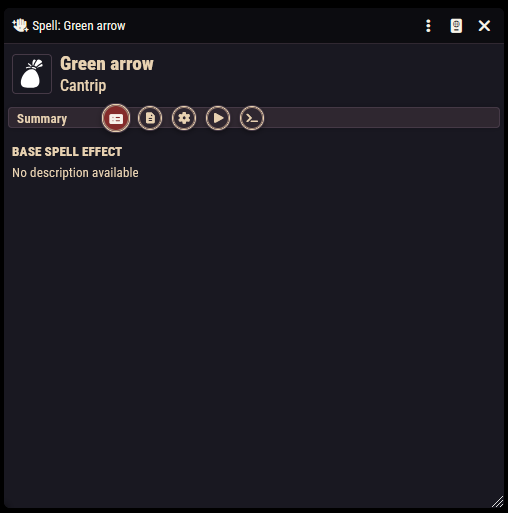
- Summary: a read-only view of the spell's descriptions, formatted the way players will read it.
- Description: three text editors (Base Spell Effect, Upcast Effect, and Higher Level Effect). The Summary tab only shows the upcast section for tiered, non-utility spells.
- Configuration: tier, school, properties, and scaling.
- Activation: cost, targets, and the damage itself. This works exactly like item activations; see Item Activations & Effects.
- Macro: an advanced scripting slot; see Macros.
Spell sheets have no Rules tab. Passive bonuses belong on features and objects, not on spells.
Step 2: Tier, school, and properties
On the Configuration tab:
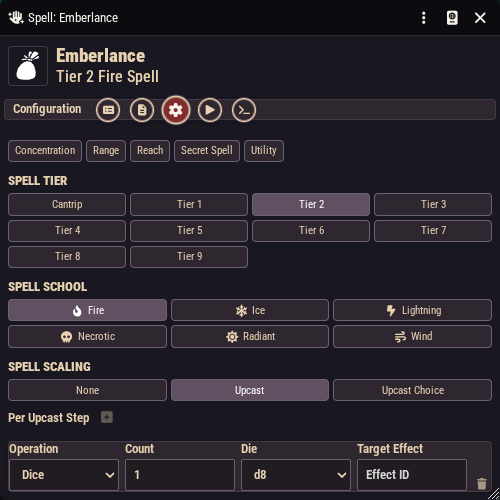
- Spell Properties: toggle any of Concentration, Range, Reach, Secret Spell, and Utility. Selecting Range or Reach reveals the matching distance configuration. Marking a spell as Utility hides the tier and scaling sections entirely, because utility spells sit outside the tier system.
- Spell Tier: Cantrip or Tier 1 through Tier 9.
- Spell School: Fire, Ice, Lightning, Necrotic, Radiant, or Wind, each with its icon.
For Emberlance: enable Range (set it to taste), pick Tier 2, and the Fire school.
Mana cost is the tier
There is no separate "mana cost" field. Casting a tiered spell automatically deducts mana equal to its tier from the caster, so Emberlance costs 2 mana. Cantrips are free. Upcasting (below) spends more. The deduction happens on its own when the spell is cast from a character.
The raw data editor
The Configuration tab has a small code button in its top corner that swaps the form for a raw data editor. You will rarely need it, but it exposes everything at once, including the spell's optional class restriction list, which limits a spell to specific classes instead of "every class that grants its school".
Step 3: The damage (Activation tab)
The spell's effect is a standard activation. For Emberlance:
- On Activation → Core, set the cost to 1 Action.
- On Activation → Effects, add a Damage entry: formula
2d8, damage type Fire, with Can Miss and Can Crit ticked, and a Damage Outcome of Full Damage under On Hit.
Anything an item activation can do, a spell can do: saving throws with half-damage outcomes, conditions, templates for area spells, notes. All of it is covered on Item Activations & Effects. Configure it there, and it just works when the spell is cast.
Step 4: Upcasting (the Spell Scaling section)
For tiered, non-utility spells, the Configuration tab ends with Spell Scaling. Pick a mode:
- None: the spell cannot be upcast.
- Upcast: a fixed set of improvements applies for each extra mana spent.
- Upcast Choice: the caster picks one enhancement from a list you define.
With Upcast selected, click Add Delta to add entries under Per Upcast Step. Each delta has an Operation:
| Operation | Extra fields |
|---|---|
| Flat Damage | a number added per step |
| Dice | a die count and size (d4-d20) added per step |
| Reach / Range | distance added per step |
| Targets | extra targets per step |
| Area Size | template growth per step |
| DC | save DC increase per step |
| Armor | armor granted per step |
| Duration | duration increase per step |
| Condition | a condition id applied per step |
Damage, dice, and DC deltas also offer a Target Effect picker that sets which effect in the activation tree the delta modifies. Leave it on Auto (first match) unless the spell has several damage entries.
For Emberlance, add one delta: Operation Dice, count 1, die d8.
With Upcast Choice selected, you instead click Add Choice, give each choice a label players will read (the compendium Heal uses "+1 target", "+4 reach", "+1d6 healing"), and fill in each choice's own deltas.
What the caster sees
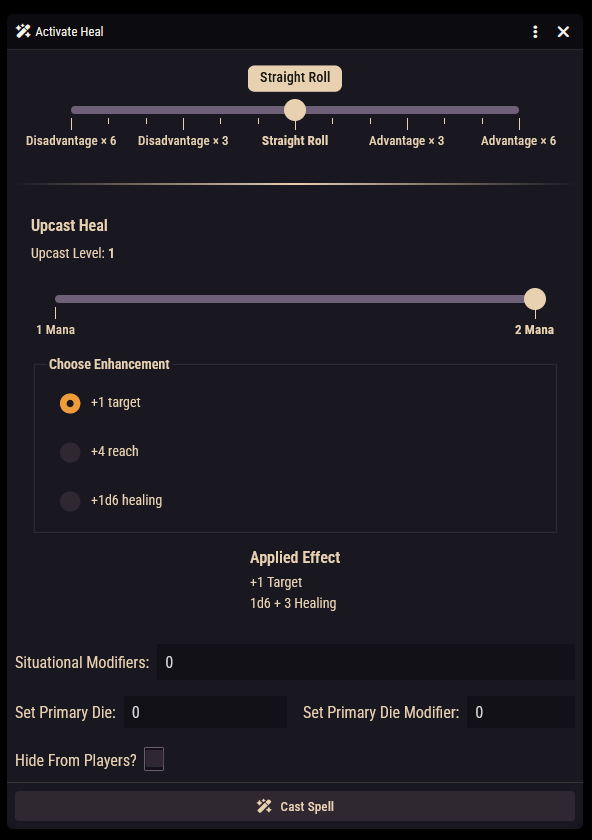
Casting a spell opens the cast window. It contains the roll mode selector, situational modifiers, and roll options that every activation window has (see Item Activations & Effects), plus the upcast controls when the spell can be upcast:
- an Upcast heading with a mana slider running from the spell's base cost up to the smaller of the caster's current mana and their highest unlocked spell tier. The caster simply drags it to the total mana they want to spend, and the Upcast Level readout shows how many steps that buys;
- for Upcast Choice spells, a Choose Enhancement list of your labeled options;
- an Applied Effect preview listing exactly what the chosen upcast adds ("+2d8 fire damage").
A spell that cannot be upcast (or a caster without spare mana) just gets the normal roll controls. Holding Alt skips the window and casts at base tier. When the caster confirms, the upcast changes are baked into the rolls and the total mana is deducted.
Getting spells onto characters
Three routes, from manual to automatic:
- Drag and drop. Drag the spell from the sidebar or a compendium onto a character sheet. Fine for one-off grants and testing.
- The character creator and level-up. School selections made during character creation and leveling pull in matching spells automatically, including your homebrew, provided its school and tier are set correctly.
- A grant-spells rule. Add a Spells grant rule to a class feature (or any rule-bearing item). It can grant by school-and-tier filter, grant specific spells you drop in, or present a school/spell choice to the player. See the grants reference.
Check the school and tier
Automatic granting filters on school and tier. A homebrew spell with the wrong tier, or left as a cantrip by accident, will silently be offered to the wrong characters, or to no one.